
The Quick Read
- New York federal courts saw 1,021 website accessibility lawsuits in 2025, more than any other state.
- That count fell from 1,564 the year before because many cases moved to New York state court, so the risk did not drop.
- We scanned 122 Rochester area business home pages. 65 percent had at least one of five common barriers a scanner can see.
- Most fixes are small. Alt text, form labels, link names, a language tag and letting people zoom.
- An overlay widget is not a fix. The FTC fined one seller $1 million over claims its tool made sites compliant.
Want DK Consulting first in Google? Set us as a preferred source
New York is the busiest place in the country to get sued over a website. In 2025, New York federal courts took 1,021 website accessibility lawsuits, more than any other state.1
That one fact changes the usual advice. Many owners outside New York can treat this as a rare problem. A small business here cannot.
And the federal number hides part of the risk. It fell from 1,564 cases in 2024, but the lawyers who track these cases say the drop came from plaintiffs moving to New York and New Jersey state courts, not from fewer claims.1
So we built a checklist an owner can run in about ten minutes. Then we ran the machine part of it on 122 Rochester area business sites to see where local sites stand.
Why New York Is Different
Most website claims start under Title III of the Americans with Disabilities Act. Title III covers businesses open to the public, and the Justice Department says that includes what they offer online.4
In New York, plaintiffs have a second path. Federal judges in New York now ask for more detail about how the person tried to use the site. One law firm noted that filing in state court lets plaintiffs avoid those stricter federal rules.2
The state court cases do not cite the ADA at all. They cite the New York State Human Rights Law, the New York City Human Rights Law and the New York Civil Rights Law.2 A Rochester shop is outside New York City, but the state laws reach the whole state.
Lawmakers have tried to slow this down. In 2021, Senator Jeremy Cooney and Assemblywoman Carrie Woerner put forward bills that would make a person send written notice and give the owner 60 days to fix the site before suing.3 When Barclay Damon wrote about it, the bill was a proposal, not a law. Plan as if there is no grace period.
The short of it. In New York a website claim can come from federal court or state court. Fixing the site is the one move that helps in both.
What We Found on 122 Rochester Area Sites
We run 585area.com, a directory of Rochester area businesses. In November 2026 we drew a random sample of 150 business websites from it and scanned each home page. 122 loaded as normal pages and made the final count.
We checked five barriers a machine can see in the page code, the same kinds of errors the WebAIM Million counts on the top one million home pages.6
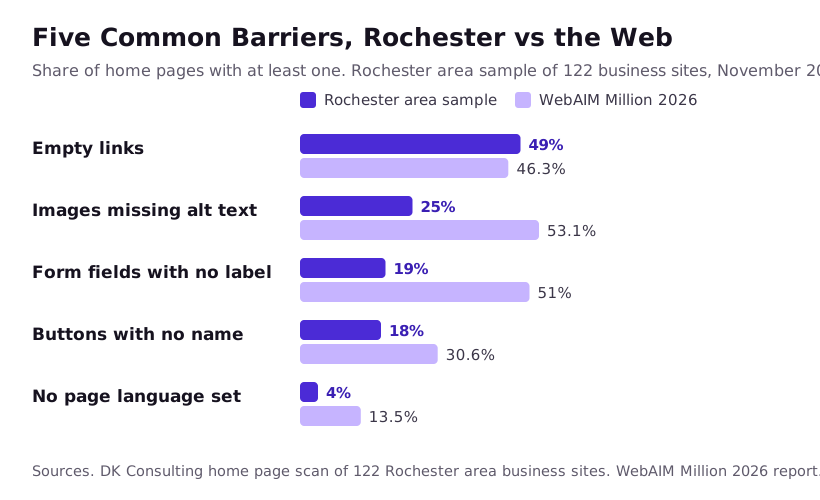
| Barrier | Rochester sample (122 sites) | WebAIM Million 2026 |
|---|---|---|
| Links with no name a screen reader can say | 60 sites, 49% | 46.3% |
| Images with no alt text | 31 sites, 25% | 53.1% |
| Form fields with no label | 23 sites, 19% (23 of the 57 sites with a form) | 51% |
| Buttons with no name | 22 sites, 18% | 30.6% |
| No page language set | 5 sites, 4% | 13.5% |
Put together, 79 of the 122 sites, or 65 percent, had at least one of the five. Thirteen sites, 11 percent, also blocked people from zooming in on a phone. Eleven sites, 9 percent, ran an accessibility overlay widget, and 9 of those 11 still had at least one of the five barriers.
Our numbers run lower than WebAIM on most lines. That fits how we scanned. We read each page as the server sends it, without running its scripts, and WebAIM tests the fully loaded page. A barrier added by a script would not show in our count, so treat these as a floor.
The empty link number is the one to notice. Half of local sites have a link a blind visitor hears only as "link." It is almost always a social media icon or a logo with no text. It is also one of the quickest fixes on this list.

The Ten Minute Checklist
The Justice Department does not set a technical rule for business websites. It points to the Web Content Accessibility Guidelines, known as WCAG, as helpful guidance.4 The checks below map to WCAG 2.2, the current version from the W3C.5 You need a phone, a laptop and your own site.
| Check | How to test it | WCAG 2.2 |
|---|---|---|
| Every photo that means something has alt text | In your site builder, open each image and look for an alt text or description field. Logos should say the business name. | 1.1.1 |
| Icons and logo links have a name | Hover on each social icon. If it has no text, add a label like "Our Facebook page." | 2.4.4 and 4.1.2 |
| Every form field has a visible label | Look at your contact form. A gray hint inside the box that vanishes when you type is not a label. | 1.3.1 and 3.3.2 |
| The whole site works with a keyboard | Put the mouse away. Press Tab over and over. You should see where you are and reach every menu, button and form. | 2.1.1 and 2.4.7 |
| Text is dark enough on its background | Body text needs a contrast ratio of at least 4.5 to 1. Large text needs 3 to 1. Free contrast checkers will test your colors. | 1.4.3 |
| People can zoom | Pinch to zoom on your phone. Then set your browser to 200 percent. Nothing should break or get cut off. | 1.4.4 |
| Videos have captions | Play each video with the sound off. If you cannot follow it, add captions. | 1.2.2 |
| The page says its language | View the page source. The first html tag should say lang="en" for an English site. | 3.1.1 |
Do the keyboard test first. It finds the problems that block real people, like a menu that only opens on hover or a booking form you cannot reach. A scanner misses most of those.
Then fix in this order. Forms, because that is where a customer tries to reach you. Links and buttons, because they are fast. Images and color last, because they take more pages to work through.
Why an Overlay Widget Is Not the Fix
You have likely seen the small round icon in the corner of some sites. It opens a menu to change text size or contrast. Many are sold as a one line way to become compliant.
The Federal Trade Commission took on that claim. In April 2025 it approved a final order requiring accessiBe to pay $1 million. The FTC said the company claimed its widget could make any website meet WCAG, and that it did not.7
The reason is easy to see. A widget sits on top of the page. If a form field has no label in the code, a screen reader user still meets a box with no name. Our own scan showed the same thing. On 9 of the 11 Rochester sites with a widget, the barriers were still in the page code.
Owners do not need to pay for a widget to show good faith. Fixing the page itself, and keeping a short record of what you fixed and when, does more.
If a Demand Letter Arrives
We build websites. We are not lawyers, so take the legal side to one. These are the steps that keep your options open.
- Do not ignore it. A letter that sits in a drawer can turn into a lawsuit with a deadline.
- Do not pay on the spot. Call a lawyer who defends accessibility claims first. Ask your business insurance agent if your policy covers it.
- Save your site as it is. Take screenshots and save page copies the day the letter comes, before you change anything.
- Fix the real problems anyway. Start with the checklist above. A settled claim does not stop the next one if the barriers stay up.
- Write it down. Keep a dated list of each fix. It helps your lawyer, and it keeps the work from sliding back in your next redesign.
The cheapest version of all this is to fix the site before any letter shows up. For a small site that is often an afternoon, not a project.
DK Consulting builds and repairs small business websites in Rochester and across the US, with the checks on this list built in from day one. If you want us to run them on your site, ask for a free site review. You can also see how we approach web design for small businesses.
Odds and Ends
Do small businesses in New York really get sued over their websites?
Yes. New York federal courts alone took 1,021 website accessibility cases in 2025, and more are filed in state court. Shops, restaurants and service businesses with a public website are all in the mix.
Is there an official ADA standard for business websites?
No. The Justice Department says it has no rule with detailed web standards for businesses. It points to the Web Content Accessibility Guidelines as helpful guidance, and most demand letters cite them.
Will an accessibility widget protect my site?
Not on its own. A widget sits on top of the page and does not fix the code under it. The FTC ordered one widget seller to pay $1 million over claims that its tool made any site compliant.
How much does it cost to fix a small business website?
It depends on the site. A five page site with a few missing labels and alt text is often an afternoon of work. A large store with custom checkout code takes much longer. Ask for a written list of issues before you agree to a price.
What should I do first if I get a demand letter?
Do not ignore it and do not pay it on the spot. Save a copy of your site as it is that day, call a lawyer who defends these claims, and start fixing the real problems either way.
Notes and Links
- Seyfarth Shaw, ADA Title III blog, Federal Court Website Accessibility Lawsuit Filings Bounce Back in 2025, accessed November 2026
- Harris Beach, New York Website Accessibility Litigation Expands to State Court, accessed November 2026
- Barclay Damon, New York State Lawmakers Propose Bill to Curb Website Litigation, accessed November 2026
- U.S. Department of Justice, Guidance on Web Accessibility and the ADA, accessed November 2026
- W3C, Web Content Accessibility Guidelines (WCAG) 2.2, accessed November 2026
- WebAIM, The WebAIM Million 2026 report, accessed November 2026
- Federal Trade Commission, FTC Approves Final Order Requiring accessiBe to Pay $1 Million, accessed November 2026