
The Quick Read
- Regular hours live under Edit profile, then Hours. Pick Open with main hours, set each day and save.
- A snow day or a holiday goes in Special hours, not your regular hours. Google allows that for up to 6 days in a row.
- Closed for longer than that? Use Temporarily closed. Never Permanently closed.
- Anyone can suggest new hours for your business. You get 4 days to answer, and then Google may side with whatever your website says.
- We scanned 279 Rochester area home pages. 40 percent showed no hours at all, and only 8 mentioned holiday or weather closures.
Want DK Consulting first in Google? Set us as a preferred source
The National Weather Service puts a normal Rochester winter at about 90 inches of snow, and over 120 inches along the lake shore east of the city.1 When a storm shuts your doors, Google keeps telling people you are open until you tell it otherwise.
That is a bad morning for a customer who drove through it.
Changing your hours on Google takes about a minute. The trouble is picking the right setting, because Google has three of them, and each one does something different to your listing.
This walk through covers all three, the holiday dates coming up, and one rule from Google that most owners never see. After four days, Google may trust your website over you.
Change Your Regular Hours
Regular hours are your normal week. Change them only when the week itself changes, like new winter hours that will last months.
- Sign in to the Google account that manages your profile, then search your business name on Google or open it in Maps.
- Choose Edit profile, then Hours.
- Next to Hours, choose Open with main hours.
- Check each day you are open, then set the opening and closing times.
- To close for lunch or split a shift, choose Add hours and enter a second set of times for that day.
- Choose Save.
Those are the steps in Google's own help page.2 Two settings trip people up.
Open with no main hours does not mean open all day. It hides your hours.2 If you really are open around the clock, set each day to 24 hours.
After you save, customers may see a short note on your profile that your hours were updated, plus a post on the Updates tab on phones. You can edit that post or delete it.2
Main hours are the only hours that decide whether Google labels you open or closed. One local search agency tested extra hour types, such as online service hours, and found they did not change rankings.6 So get the main hours right before you add anything else.
Snow Days and Holidays Go in Special Hours
A storm day is not a new schedule. If you change your regular hours for one bad day, you have to remember to change them back, and that is how a listing ends up wrong for a month.
Special hours fix one date and leave your normal week alone. Google allows them for closures or changed hours of up to 6 days in a row.3
- Choose Edit profile, then Hours.
- Next to Special hours, choose the pencil icon.
- Pick a date Google suggests and choose Review, or choose Add a date.
- To close all day, leave Closed checked. To open late or close early, uncheck Closed and enter the times.
- Choose Save.
Special hours only show if your profile is set to Open with main hours.3 If you hid your hours, Google has nothing to override.
Google also says to confirm your hours for official holidays, even when they match your regular hours.3 It shows customers the hours were checked for that day.
Set the next three holidays tonight. Thanksgiving is Thursday, November 26. Christmas is Friday, December 25. New Year's Day is Friday, January 1, 2027.
Late night shops have one more rule. A single set of special hours cannot run past 24 hours. If you stay open past midnight, Google wants it as two sets, one ending at midnight and one starting at midnight the next day.3

Seven Days or More Means Temporarily Closed
Longer closures get a different switch. Go to Edit profile, then Hours, choose Temporarily closed, and save.4
Google's own pages do not agree on a closure of exactly seven days. The special hours page sends a closure of 7 or more days in a row to Temporarily closed.3 The closing page says 7 days or less can use special hours.4 Six days or fewer is special hours on both pages. Eight days or more is Temporarily closed on both.
The label has a cost. Google says temporarily closed businesses can rank after open businesses on broad searches, depending on the category and the search.4 So use it for a real shutdown, like a remodel or a burst pipe, and switch back the day you reopen.
Never pick Permanently closed for a pause. Google says a permanently closed profile can still show up when people search for it, marked closed.4 Nobody calls a business that Google says is gone.
| What Happened | Use This Setting | Change It Back? |
|---|---|---|
| New winter hours for the season | Regular hours | When the season ends |
| Snow day, closed or late open | Special hours for that date | No, it ends by itself |
| Holiday, open or closed | Special hours for that date | No, it ends by itself |
| Closed 2 to 6 days in a row | Special hours for each date | No, it ends by itself |
| Closed 8 days or more, or no end date | Temporarily closed | Yes, the day you reopen |
| Business sold or shut for good | Permanently closed | Not meant to be undone |
Your Website Breaks the Tie
Anyone can suggest new hours for your business on Google. A customer who found you closed during a storm might do just that.
Google says that when a suggested edit needs your review, you may get an email or a notice in your profile. You then have 4 days to accept or reject it. If you do not answer in time, Google may publish the change if other public information, such as your business website, supports it.5 Google can also apply some user edits with no review at all.5
Read that again with your own website in mind. If your site still shows last year's hours, it can back up the wrong edit.
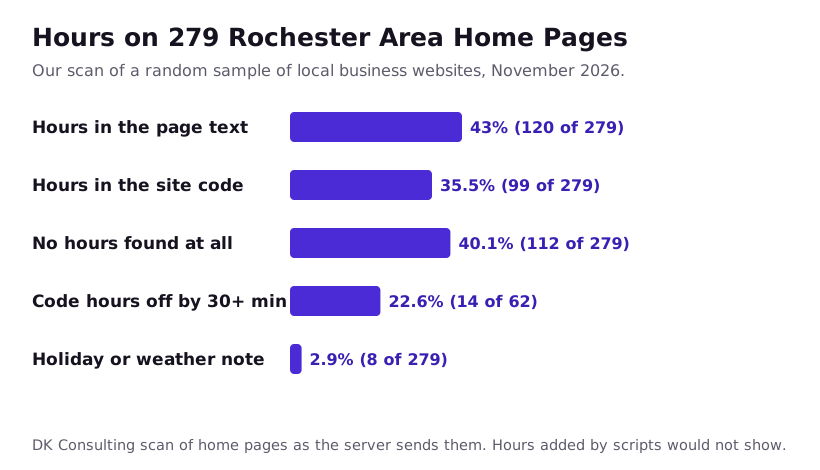
So we checked how Rochester area websites handle hours. In November 2026 we drew a random sample of 300 local, single location business websites and scanned each home page. 279 loaded and made the final count.
| What We Looked For | Sites | Share |
|---|---|---|
| Hours in the visible page text | 120 of 279 | 43.0% |
| Hours in the site code that search engines read | 99 of 279 | 35.5% |
| No hours found in either place | 112 of 279 | 40.1% |
| Any note about holiday hours or weather closures | 8 of 279 | 2.9% |
| Code hours off from the map listing by 30 minutes or more on at least one day | 14 of 62 | 22.6% |
We read each page the way the server sends it, without running its scripts. Hours that a script adds later would not show, so read the first two rows as a floor.
Two numbers stand out.
Four in ten home pages gave Google no hours to check against. That leaves the tie to whoever spoke last, which may be a stranger with a phone.
Worse, more than one in five sites we could line up day by day had hours in the code that did not match the hours on the same business's map listing. One opened at 8 in the code and at 9 on the map. Another closed at 6 in the code and at 5 on the map. Small gaps like these tell Google that one of the two is wrong, and it gets to pick which.
The fix is boring, and it works. Keep one set of hours, and put it in the same three places every time you change it. That means your Google profile, the visible footer or contact page of your site, and the hours in your site's code.
A Rochester Winter Hours Plan
Lake effect storms do not give much notice. Do the slow parts now, so a storm morning takes five minutes.
Before Thanksgiving
- Set special hours for November 26, December 24 and 25, December 31 and January 1.
- Check your regular hours on Google against your website, day by day.
- Add a spot on your website for a short closing notice, near the top of the home page.
- Make sure two people can sign in to the profile, so a storm does not wait on one phone.
On a Storm Morning
- Add special hours for today. Closed, or the late open time.
- Put the same line in the website notice.
- Change your phone greeting to match.
- If you have Apple Maps or Bing listings, change them too.
The Day After
- Clear the website notice.
- Check your profile for any hours shown in blue. That means Google changed them.5
- Answer any suggested edit right away. Do not let the 4 days run out.
Hours are one small part of a profile. See how we handle Google Business Profile help for small businesses. If your website is the part that is out of date, our look at website design prices in Rochester shows what a fix should cost.
DK Consulting builds websites and runs Google profiles for small businesses in Rochester and across the US. We will check your hours on your site and your profile for free, and tell you where they disagree. Ask for a free site review.
Odds and Ends
Why is Google showing the wrong hours for my business?
Most of the time a customer suggested new hours, or Google found different hours somewhere else, like your own website. Fields Google changed show in blue in your profile editor.5 Fix the hours on your website first, then fix them on Google, so the two agree.
How long does it take Google to update business hours?
Google does not promise a set time, and some edits go to review before they show. That is why holiday hours belong in your profile weeks ahead. On a storm morning, save the change as early as you can and check your profile again an hour later.
Will marking my business temporarily closed hurt my ranking?
It can while the label is on. Google says temporarily closed businesses can rank after open ones on broad searches.4 That is why a short closure belongs in special hours. Switch back to open the day you reopen.
Can I change my Google hours from my phone?
Yes. Search your business name in the Google app or open Google Maps while signed in to the account that manages the profile. The same Edit profile and Hours options are there.
Do I need to set holiday hours if I am open as usual?
Google says it is a good idea to confirm your hours for official holidays even when they match your regular hours.3 It tells customers your hours were checked for that day.
What does Open with no main hours mean?
It hides your hours from your profile.2 It does not mean you are open all day. If you are open around the clock, set each day to 24 hours instead.
Notes and Links
- National Weather Service Buffalo, Rochester Climate Narrative, accessed November 2026
- Google Business Profile Help, Edit your business hours, accessed November 2026
- Google Business Profile Help, How to set Special hours, accessed November 2026
- Google Business Profile Help, Mark your business as closed, accessed November 2026
- Google Business Profile Help, Understand Google updates on your Business Profile, accessed November 2026
- A local search agency, notes and a test on Google business hours, accessed November 2026